Time for a break
About every 30 minutes, take 5–10 minutes away from screens. Look into the distance out of a window, or try animal guessing, copying movements, a paper maze, chess or Jungle. Do not switch to a phone or video during the break. An adult keeps track of the time; children can take a break sooner if they need one. Include breaks in the total lesson time, shortening computer tasks or presentations accordingly. For a session of about two hours, plan breaks around minutes 30, 60 and 90.
Talk about your ideas and draw a maze
Draw a maze
Tell your friends what you want to do first. Let’s see what AI can do for us. Let’s draw a maze together.
Little teacher leads students / 60 minutes / Suggests 8–12 people / Two people per group / Added double-person activity record; 60-minute group plan pending trial teaching
What should I take away from this lesson?
First ask the children to talk about what they want to do, practice listening to their partners, and then use life situations to distinguish "what can I do, how can real people help me, and which part can AI tools help". Maze is a joint project to create ideas. Expression and relationship understanding are throughout the creation, not just discussed in the game.
- Expression:Each child is given the opportunity to speak, draw, identify, or ask a friend to help him/her; he/she can retell a partner's wish without changing his or her own answer for the partner.
- People and AI:Be able to choose someone to ask for help in a life situation and give reasons; know that AI is a tool made by people, not people, and will make mistakes. Important decisions need to be checked by people.
- Works:Each group saves a maze JSON in either 7 × 7 or 11 × 11 format, including S (start), 1–3 light crystals, L (ladder along the wall), and D (exit door at the top of the walls); paths from start to items/ladder and from the wall top to the door must all be accessible.
- Cooperation:Each child operates and acts as an observer at least once; when hearing different ideas, first ask "Why do you think so?"
- Improved evidence:Record where the friend stopped, change one place according to the record, and try again; use "I saw...so I changed it..." to explain the reason.
Deliverables at the end: Each person has a “My Idea / What I Ask AI to Help With / What I Will Check” card; each group has one playable work and V1/V2 playtest records; each person shares one closing thought. Level completion speed and the number of enemies defeated are not used for learning evaluation.
Preparation before class: Let the teacher get it and start the class
| Preparation items | Specific methods | completion signal |
|---|---|---|
| People | The teacher presides over short questions, listening, and transitions; an adult co-leads the class and is responsible for equipment, accounts, timing, order, and rescue. 8–12 people suggested 1 additional teaching assistant. The young teacher can raise his hand at any time and ask an adult to take over. | Little teachers don’t have to troubleshoot computer problems alone, nor do they have to do their classmates’ work for them. |
| Equipment | One computer for every two people, one for the teacher to cast the screen; Chrome/Edge. Start the hosting service in advance, and connect each device to a local area network. When multiple groups are used at the same time, the volume on the student side is set to low, and the teacher side plays public sound effects. | Actually open the hand-drawn first level, creation template, and editor from a student device; verify movement, collection, ladder climbing, and JSON export. |
| Paper materials | There are 6 pages of student cards in total: Page 1 combines the wish expression and "My thoughts/What does AI help/What to check" into one sheet, 1 sheet per person; Pages 2-5 have 1 sheet for each group; Page 6 backup activities are printed on demand. Prepare pencils and two colors of pens. | Page 1 Only communicate in this group and be taken away by the children. No photos will be uploaded; real names are not required. |
| Opening video | Play the entire 35-second opening film on the interactive screen in advance to confirm the Chinese dubbing, subtitles, cat meows and music volume. The video file is experience/intro/sample-35s-final.mp4, and the cover is sample-35s-final-poster.jpg; it should have been downloaded locally before class. | Prepare a video-less narration version: In case of a malfunction, the teacher directly tells the story using screencast text without waiting for networking or generation. |
| First experience and creation template | For the first experience, you must enter the first level originally hand-drawn by the small designer, and the map remains intact. starter.json is an independent 7 × 7 practice template for subsequent creation sessions and does not replace the first level; keep a draft backup of this tab before importing. | Confirmed that the title of the first trial is "First Step on Paper", not "Little Explorer·Classroom Introduction". The class first explores the vicinity of the entrance for about 90 seconds, and then switches operators. It is not necessary to complete the level during the experience period. |
| Support method | Prepare three participation methods: direction key operation, companion operation, and grid walking on the desktop paper. If the child is unwilling to move, point to A/B; if the child is unwilling to speak openly, point to a picture or have a partner explain it. | All children can participate in the same design task. |
Teacher’s self-check before starting: □ LAN entry is available □ Existing work is backed up □ Templates can be imported □ Volume is appropriate □ Paper cards are printed □ “Get items first, then climb the ladder, and finally walk to the door” has been demonstrated.
60-minute process|Teach the class together, do not let the little teacher hold the class alone
Total timing: 4 + 6 + 7 + 6 + 4 + 3 + 10 + 8 + 6 + 6 = 60 minutes. The goal of the class is to express, choose helpers, check and modify; we do not promise that classmates and children will learn programming in one class. Used by young teachersSentence-by-sentence script, adult useSupport and Rescue Manual。
| Time | What does the child do? | Little teacher/adult division of labor | Evidence |
|---|---|---|---|
| 0–4 points | Watch the 35-second video of Xiaobi giving mooncakes; say, draw, or point: Who do you want to share your kindness with? | The little teacher asks "What do you want to say to him?" Wait 5 seconds; the adult plays and explains that this is an AI-generated fairy tale. | A wish or intention. |
| 4–10 points | Desire and retelling: Each person speaks for one minute, the listener retells, and the original author can correct it. | Demonstration and transition by young teachers; adults form pairs, allowing drawing, pointing, narration or temporary skipping. | Each person is heard once. |
| 10–17 minutes | "Who can help" three scenarios, choose me/real person/AI, tell me which step to help. | The primary school teacher asks the reason first and does not give a standard answer; adults deal with the boundaries between emotions and important decisions. | A choice and reason for seeking help. |
| 17–23 points | Listen to the teacher's explanation of the source of the photo → Clear request → Reference frame → H3 clip → Human review and modification. | The primary school teacher asks the children to find a pattern or subtitle; adults can choose a short live text request, and if there is no result within 60 seconds, they will immediately use the offline real material. | Know which step is decided by humans, generated by AI, and then checked by humans. |
| 23–27 points | Experience the full hand-drawn first level entry. Two people exchange for about 90 seconds; completing the level is not required. | The peer helper says “find a fun or unclear place”; the adult demonstrates movement and collection, and describes the path from ladder to door. | An observation. |
| 27–30 minutes | Write, draw or dictate a three-sentence card: my idea / what I ask the AI to help / what I will check; circle a maze change. | Adults can write the original words; write "Hope it helps" in the AI column and do not pretend that the child has called the AI. | One idea and review card per person. |
| 30–40 minutes | Use independent 7 × 7 template to make V1 with only one change; change operator at 35 minutes. | The primary school teacher inspects and asks questions; adults read and verify, assist in exporting, and do not make decisions for children. | Team name-V1.json. |
| 40–48 points | Two adjacent groups test each other on the same task of "finding the first light crystal"; each takes about 3 minutes, leaving 2 minutes for the handover record. | The author watches quietly for 60 seconds; the teacher reminds him to “observe first” and the adult helps record the actual pause. | V1 trial observation. |
| 48–54 points | Change one thing, let the same partner try the same task, and then save V2. | The teacher asked "What does this change solve?" The adult reminded that familiarity with the route will also affect the second performance. | V1/V2 records and justification. |
| 54–60 points | Everyone says something to their partner first, and both groups voluntarily show it; save and take away the card. | Little teacher: "My idea is...AI can help...I will check..." The adult collected the works and records. | Share one closing thought; do not compare completion speed. |
Main activity A: My little wish|6 minutes
Target:Each person talks about an idea, and the partner talks about what he heard after listening.Materials:Each person has a wish card and colored pens; the screen projection only provides sentence structures, and does not record names, voices or wishes.
- 1 minute: The little teacher demonstrates with his own manuscript: "You can call me... I want to do it... because I hope..." The adult said: "It doesn't have to be a game, it can be a gift for a friend, a picture book, a song, or a small animal house."
- 1 minute: Each person draws or thinks of their own wish. You can start by just drawing a picture, without asking for explanations of family experiences or emotional privacy.
- 2 minutes: Two people take turns, about 1 minute each. The listener does not comment on whether it is good or not, and does not rush for ideas; he or she can ask, "Which part do you like best?"
- 1 minute: Repeat to each other: "I hear you thinking..." The original author can nod, add, or correct.
- 1 minute: Invite two volunteers to share a sentence that their partner allows to share, and then transition: "If one person can't do it, who would you like to ask for help?" Children who do not want to speak publicly can point to the picture, have their partner narrate it, or skip it.
Observation:Pay attention to whether there are opportunities for expression and whether the retelling is accurate, without ranking the vocabulary or voice volume. This activity is original to the course; the paper cards are taken away by the children, and the teacher does not default to taking photos, uploading or inputting to AI.
Main Activity B: Who can I ask for help with this matter|7 minutes
Props:Three help cards "Me/Friends, Family and Teachers/AI Tools".Rules:For each scenario, you can choose one, multiple, or none at the moment; say "who to ask first, which step to help, and who to check." What is displayed on the screen is pre-written classroom scenarios and discussion references, not live AI output, and there is no accuracy rate or ranking.
- 1-minute introduction: "AI is a tool made by humans. It can help us find ideas, change images, or test text. It is not a human and may make mistakes. Partners and teachers are people who can accompany and help us in real life. We will also figure out our own solutions."
- Discuss the first three cards in about 4 minutes and 30 seconds, about 90 seconds each: first give 10 seconds to think by yourself, then talk to your partner, and finally ask a group to explain their choice. The teacher starts a discussion and reference after listening to the reasons.
- Ending in the last 1 minute and 30 seconds: "You can ask for different helpers for the same thing. If what the AI says is true, you have to check it. To take care of yourself and make important decisions, you should make them with a trusted adult." The remaining cards are left as extensions to avoid crowding out creation.
| Scenario | Discussable ways to help | Question |
|---|---|---|
| Main card 1: I want to draw a small animal house, but I haven’t figured out what it looks like yet. | I draw the part I like first; my partner listens to his ideas; the AI can give some ideas on the appearance. I choose what to leave behind. | Which part should you keep your own ideas? |
| Main card 2: I had an argument with my friend today, and I was a little sad. | I can talk about my feelings first, pause, and find a real partner, teacher, or family member to listen. AI can help formulate a sentence to speak, but it cannot reconcile friends, nor can it replace real companionship. | What exactly would you like to ask the people around you to do? No need to share your true experiences. |
| Main card 3: The screen says “You can definitely climb the block ladder even if it's suspended in the air.” I'm not sure. | This is a suspicious statement pre-written by the teacher, not a real AI answer. Stop following the instructions first and ask an adult to check with you using paper drawings or safe tabletop models; do not stand on real furniture to test. AI recommendations cannot be taken as fact just because they are certain. | How to know whether a statement is credible? Who will help with the inspection? |
| Extension: The story is missing an ending. | I decide what the character wants; the companion can continue a sentence; the AI can provide multiple endings. Selected and rewritten by me, no need to adopt the first one. | If you don’t like all the suggestions, can you think of it yourself? |
| Extension: I have to decide who to send my photos to. | I won’t send it yet and ask parents or teachers to decide together; AI cannot make this decision on behalf of guardians. No photos will be submitted at the event. | Which real adult can check in with you? |
Available teacher responses: "It's interesting that you chose two helpers. Which step do you want them to help with?" "If the AI's idea is different from yours, you have the right not to adopt it." "We are talking about the children in the story, and there is no need to talk about things you don't want to share." Avoid saying "AI is the friend who understands you best" or "AI knows everything."
Opening video with glitch replacement | Contained in 0–4 minutes
The video is 35 seconds in total: the first 30 seconds are spent by Xiaobi (a calico cat) kneading, stuffing, molding, baking, and boxing, and then giving them to Jinzi (a civet cat), Xiaofei (a black and white cow cat), and Xiaomai (a white cat); the last 5 seconds show the AHALab × ZimaBlueAI poster, and send "Happy Mid-Autumn Festival, reunion with full moon people" with subtitles and dubbing. The four characters are all derived from real pet photos provided by users into AI realistic fairy tale images, and are not real cats cooking on site.
Read it first, without talking about knowledge in the middle; first ask: "Who do you want to give the gift to? What do you want to say to him?" Allow the child to speak, draw or identify, and then ask: "What did the person think of, and what did the AI help do?" Adults explain the division of labor in the production: the person chooses the story, pet photos and sound settings, checks and decides; AI helps generate realistic images, dubbing and music. The finished film comes with Chinese subtitles, Chinese vocals, cat meows and actual YuE2 + ACE-Step music. The names of the tools are only for teachers to prepare lessons and do not require children to memorize them. The cat in the film is a fairy tale character, not an AI, nor a real person using the AI.
During the initial 0–4 minute discussion, choose one follow-up question: "Real cats meow, so how do they speak Chinese and make mooncakes?" Acknowledge the child's observation: "The realistic cat fairy tale scenes and voiceover generated by AI are not footage of real cats or actual conversations. Speaking Chinese and making mooncakes are stories created by people." You may imitate a "meow" to join in, but do not treat the realistic visuals as evidence that these events actually occurred.
Narrated version without video:"Xiao Bi (the calico cat) wanted to give a gift to a friend. She carefully made mooncakes, placed them in small boxes, and gave them to Jin Zi (the tabby cat), Xiao Fei (the black-and-white cow cat), and Xiaomai (the white cat). Each time she gave one away, she wanted to say something to her friend. If it were you, who would you give the gift to? What would you say?" Then add: "These realistic cat fairy tale scenes and voiceover are AI-generated; they are not footage of real cats or actual conversations. Real cats meow; speaking Chinese and making mooncakes are stories created by people. Today, you can also create your own work." Display the same text on the screen without waiting for network generation.
Teacher Notes:This is an anthropomorphic fairy tale and should not be used as a demonstration for feeding mooncakes to real cats. Next, hold up the little designer's sketch to connect "making a gift for a friend" with "creating a level for friends to play." Do not refer to the cat characters as AI partners.
Real AI creation evidence chain|17–23 minutes
UseCast screen "How can AI help"View the real production process of this time: parents provide pet photos (teacher dictates the source, the original photos are not distributed with the classroom package) → Classroom simplification request → Actual reference frame → Real H3 video clip → Final version after human review and modification. Teachers can produce original photos if authorized, but this is not required. The page shows the actual generated materials before class, and the model will not be called on-site. The first 30 seconds of the 35-second film are six H3 shots, and the last 5 seconds are static posters specified by the user; the human voice is a post-production, and there is no claim of real cat speech or precise lip synchronization.
- 17–18 points:Looking at the actual reference frame, the teacher said "Parents provided photos of pets and requested that the characteristics of each cat be preserved." Little teacher: "Which pattern do you see?" People first decide who it is and what it does; children are not allowed to guess which cat is more similar when the original photo is missing.
- 18–19 points:Read the simplified classroom prompt: "Please refer to Xiaobi's photo and have her make mooncakes in the kitchen for Jinzi, Xiaofei, and Xiaomai, keeping each cat's unique pattern." Explain that this is a simplified version for children to understand, not a verbatim record of the original model request.
- 19–20 points:Play the generated 5-second H3 stamped clip and compare it to a static reference frame: where is the movement? Stay silent and observe. After stopping, he said: "This was generated by AI before class, not just after I pressed the button."
- 20–21 points:Adults may optionally demonstrate a short text prompt: "Write two different blessing messages for the story of Xiaobi giving mooncakes. Each message must be no more than 12 characters long and must not include real names." Let the child choose or reject one message. Only adults should operate pre-logged accounts; do not enter children's information. Wait up to 60 seconds. If there is no result, say exactly: "This time nothing was returned. Let's look at the materials generated before class." Return to the final closing blessings without pretending it is a new answer.
- 21–23 points:Look at two actual reference frames: the tray in the bottom left changed from 4 mooncakes to 2, consistent with the boxing shot; this comparison changes the quantity, not the cats' identities. Also note that names and patterns were manually verified, the final video was redone with a single set of subtitles at the bottom, and the authentic AHALab logo was used. Have the child select one "place I will check" to connect to the maze: "To see if a work is good, you need others to look at it, try it yourself, and then revise it."
Whether to conduct on-site requests only changes the display method, not the learning objectives. Use this set of real-life generated materials directly when offline; do not turn button switches, random results of mini-games, or scenarios pre-written by the teacher into AI's on-the-spot answers. The photos will only use pet materials that have been authorized by the user this time, and no new children or family photos will be uploaded.
Alternate Activity: Explorer Choose One
Choose one of the following, robotics and voice activities do not occupy the ice-breaking time of the main class; they are used to arrive early and replace expansion activities or after-class extensions of the same length. They cannot replace individual expression and relationship discussion.
Time:5 minutes; whole class participation.Props:A / B cards or interactive projection.Target:Let children meet partners and discover that play preferences can vary.
- Adult instructions: "A is on the left, B is on the right. You can walk slowly, or you can sit down and point to me. There is no right answer."
- The three-round questions are as follows: fox character/robot character; forest world/ice and snow world; look at the route first/take two steps first. Allow about 5 seconds for each round to choose, and then ask a volunteer child to explain in one sentence.
- Let the children and their partners say each other's names: "I am...I chose...what about you?" In the last round, no labels are given according to personality, and adults help each two people form a team.
- Transition: "In the same level, some people like to observe first, while others like to try first. When designing, we need to see how our friends actually go."
Activity adaptation:The mechanism of "expressing choice with position" is retained and reduced to three rounds, allowing both parties to like and speak privately. Source of inspiration:Ice Breaker Games · Choose One; The questions, duration and support methods of this card are self-written for this course.
Alternate activity: Let me go, Brick Robot
Time:6 minutes; work in pairs.Props:Paper card 5 × 5 grid with a chess piece, or robot in interactive projection.Target:Experience clear instructions, taking turns, and asking questions.
- The two sat in the same direction, and the robot began to face the top of the paper. The commander sees the route and the operator only listens to the instructions. Adults first demonstrate "forward one space" and "turn right"; turning only changes the direction, but does not move.
- First round of 90 seconds: Only one move can be said at a time. When it reaches the wall, the robot stops and says "there is a wall ahead"; it is called "stupid" if it does not cross the wall and does not call its partner's operation.
- Swap roles. Second round of 90 seconds: Operators are allowed to ask questions, and the commander can repeat or point to the direction arrow to explain.
- Finally, spend about 1 minute comparing: "Which sentence is the clearest? What is the difference after adding questions for the second time?" Each group writes or draws two instructions.
Activity adaptation:Learn from the gameplay of "the describer and the executor have different information", change it to a grid on the table, allow questions and gestures, and do not blindfold or allow children to walk with their eyes closed. Source of inspiration:Ice Breaker Games · Blind drawing game;The robot rules were adapted for this course.
Interactive Backup Card: Sound Detective and One Sentence Story
Sound Detective|2–3 minutes
Use the screen projection "Sound Detective": play the sound effect once, let the child use gestures to select "get something/hit/scatter the blocks/pass the level", and then reveal and demonstrate the corresponding picture. Ask: "Just listening to the sound, can you know what you have done?" Ask the children to draw a success mark on their level. This activity is directly taken from this game and is original to this course; it can replace the sound effect demonstration before the trial and does not exceed the 60 minutes.
One Sentence Solitaire|3 minutes
The peer helper starts: “We climbed up the ladder and saw a door...” Each group discusses for 20 seconds, taking turns to contribute one sentence: “Behind the door is...”. Participants may say only one word, point to a character image, or skip; the adult strings these into a short story. End by asking: “If the world behind the door was the world you imagined, what would you collect in this level?” Suitable for early arrival or the 75-minute version. Adapted from Ice Breaker Games · Story Solitaire 's turn-taking and continuation mechanism; children's situations, participation methods and duration are self-written for this course.
Workbench operation with two exit locations
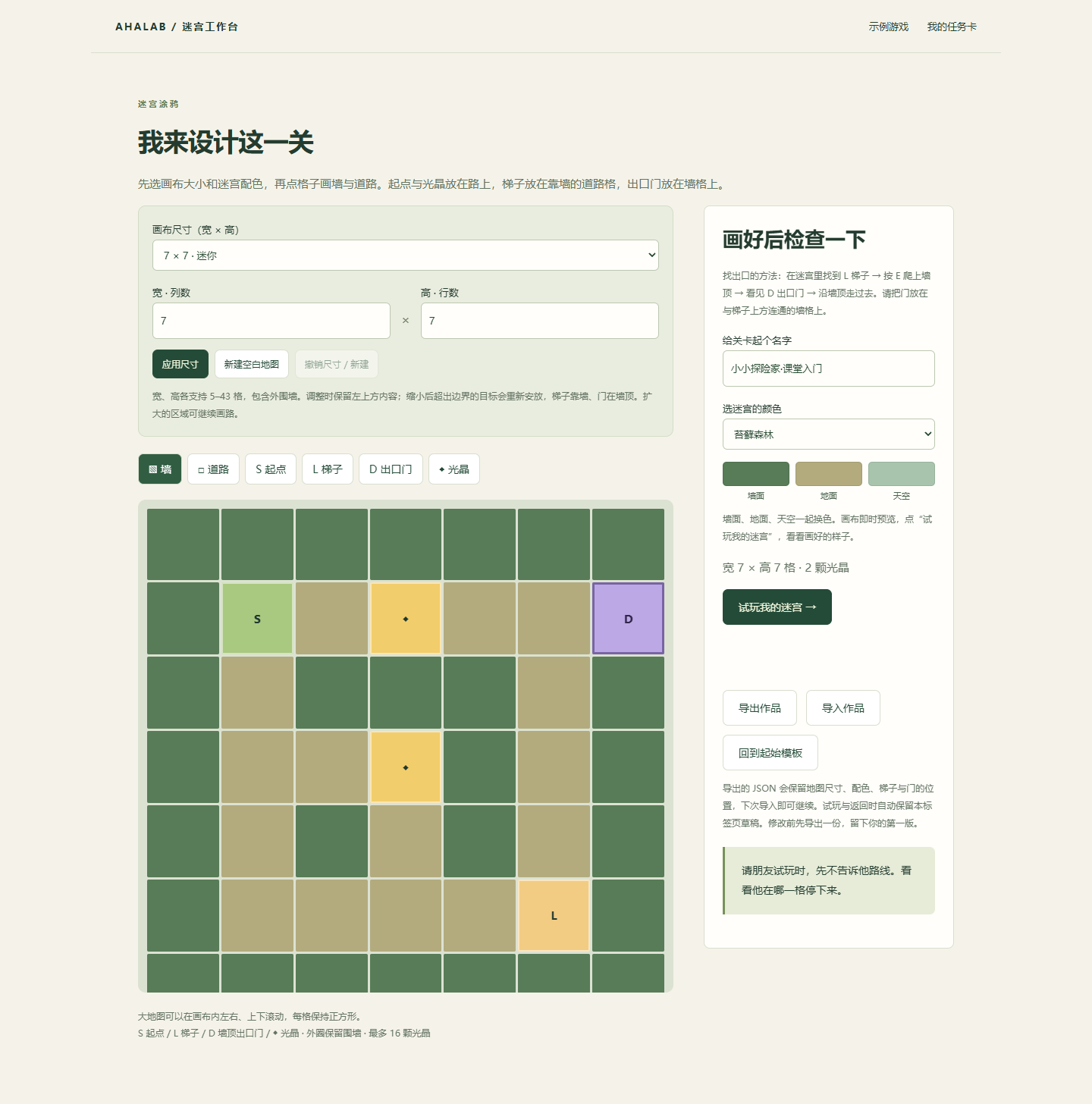
- First, complete the original experience through "Experience the First Level of Hand-painting". When you get to the creation stage, open the independent creation template and click "Load Creation Practice Template"; this small template is only used for learning and editing, not the first level.
- Select brush: Wall / Road / S Start / L Ladder / D Exit Door / Light Crystal. Place the ladder on the road tile against the wall, and the door on a wall tile.
- Check the two route segments separately: first trace the path on the road to items and the ladder, then trace the path from the wall tile next to the ladder along the connected wall top to the door. The door cannot be reached only by “climbing up and arriving”.
- Click "Try My Maze" to try it out. If the verification prompts that you cannot reach any area, go back to that area and check if there are any discontinuous points.
- Export V1 and try it with a friend; make only one change based on the records, and then export V2. Adults can help enter the team name when saving the file name.
Capability boundaries:This lesson's editor supports roads, walls, items, ladders, doors, dimensions, and color schemes; children cannot add NPCs or dark rules in the editor. The darkness and torches after Level 5 are provided as existing sample experiences; unimplemented features should not be listed as classroom production tasks.
How to use new game effects for teaching
| Picture and sound | Let the children observe | How to use the main course |
|---|---|---|
| Collect: star point, aperture, +1 and short beep | The item disappears and the count is increased. I knew what I was getting. | Must do: Experience feedback and predict what will happen without feedback. |
| Cleared the level: Celebration sound and colorful building block confetti | After completing the collection, going up the ladder, and walking to the door, a completion prompt will appear. | Must do: tell the order of passing conditions. |
| Knockback: NPCs scatter into bouncing blocks | A hit has different feedback than a completed knockback; the block will hit the ground and disappear. | Optional: short demonstration by teacher, children are not required to participate in the battle. |
| Starting from the fifth level: darkness, short-distance front light, fire source and torch | Unexplored areas are hard to see; after taking the fire source, you can light the torches one by one, leaving visible markers. | Optional: If the child is willing, observe it for about 1 minute; if you are not willing to experience it, you can take a screenshot or click back to the light. |
Lit torches remain lit throughout that level. If you encounter an NPC and return to the entrance, the fire source and torch states are preserved; restarting the level resets them. Lighting all torches is an optional aid for exploration, not a mandatory condition to clear the level.
Layered support and short course adjustments
| Current performance | Different depths for the same task | Teacher Scaffold |
|---|---|---|
| Getting started: Need help reading or operating | Keep the 7 × 7 template, move 1 light crystal or open 1 grid, and be able to tell the purpose of the modification. | Adults read the buttons and partners operate; children use pointing to make decisions and are not grouped by age. |
| can move and read prompts independently | Design one fork in the road, place 2–3 light crystals, and set up a ladder and a door. | Use your fingers to check two sections of the route before trying it out, without pointing out the answers for your child. |
| Already have game design experience | Predict a trial behavior, record the number of requests for help or pause position of V1 / V2, and explain a modification. | Keep the same mission with the trial players, reminding players that familiarity with the map will also affect performance. |
45 minute version:0–3 Opening (3) + 3–8 Retelling of wishes (5) + 8–13 Two scenarios of asking for help (5) + 13–18 Real AI evidence chain (5, not generated on-site) + 18–21 Hand-drawn first level (3) + 21–23 Three sentence cards (2) + 23–31 Modified template V1 (8) + 31–37 Mutual test (6) + 37–41 Modification V2 (4) + 41–45 Save outside the hall (4) = 45 minutes. Move only one light crystal or change one path, retaining each person's expression, real AI material and one modification.
75 minute version:In addition to the 60 minutes, add 3 minutes for the story solitaire, 7 minutes for the second friend's blind test, and 5 minutes for the work presentation. The dark level is still an optional demonstration and does not crowd out creation.
Teacher’s questions, stuck points and observation records
| What I saw | What did the teacher say? | Next step |
|---|---|---|
| A child keeps grabbing the operation | "The operator is responsible for the spot and the observer is responsible for watching. Exchange after the bell." | Place character cards on the table and clearly switch positions at the 35th minute. |
| Companions keep leaking routes | "Watch for 60 seconds without rescue. Where do you see him hesitating?" | Give the author a pen; give a reminder when the tester takes the initiative to ask for help. |
| Door or ladder verification failed | "Is L against a wall on the road? Is D on top of a connected wall?" | Check the ground and the top of the wall separately; move only one target and try again. |
| Child stuck in 3D operation | "You tell me the direction and let me or my partner operate; we will switch in the next round." | Use the arrow keys first, or verify the same design on paper instead. |
| Fear of the dark or monsters | “You can choose a bright garden, but the design is still very challenging.” | Use the classroom template or levels 1–3 and do not require an explanation of the reason for fear. |
| I just want to change the color and add content | "Where was my friend stuck just now? Make that place clearer first, and then decorate it." | Complete V1 first → Observe → Modify once and leave the decoration for the rest. |
Each item on the teacher's observation form records "not yet observed/achieved with support/can explain independently": ① Express wishes in the way of one's own choice; ② Able to retell partner's ideas; ③ Explain the help object, AI help and parts that need to be checked by humans in a scenario; ④ Two sections of the route are accessible and there are turns for observation; ⑤ Modify the corresponding real trial record. Not speaking for the time being does not mean that you don't know how to speak. The teacher only records an idea that the partner allows to share.
How to practice before class
Press firstAdult Support HandbookCheck the technical functions and let the little teacher take itHost draftWalk through a 12-minute time-lapse rehearsal with an adult. See itemized records. Whether the equipment, web pages, and printing can run is a technical verification; whether the children understand, are willing to express, and whether they can complete the work within the time limit must wait for actual classroom observation, and "teaching effect has been verified" cannot be written in advance.
A message to parents after class
Today children expressed what they wanted to create, heard their partners’ wishes, and discussed how they, real people, and AI tools could each help. Children also turn maze ideas into playable levels, taking turns operating, observing and modifying them. You can ask: "What is your wish?" "Who do you ask to help with which step?" "What things need to be checked?" "What did you change after your friend tried it out?" The JSON brought back can be imported next time. The class does not require children to register an AI account or submit personal information. Adults can demonstrate an on-site AI request for non-personal information; whether it is carried out will be subject to the record in class. Offline pre-generated materials will be clearly marked and will not be treated as live answers.
Traceable course objectives and references
The main Bloom level is "Create" (modify and make a level), and the support level is "Evaluate" (select modifications based on trial play evidence). The following is the transfer design of the theme map for this lesson. The age range is used for lesson preparation and is not used as an elimination criterion.
| Subject and Source Planning Age | Preparation | Evidence for this lesson / Activities / Bloom |
|---|---|---|
| mt__p5n8z5soJ Step-by-Step Instructions Source planning introductory stage; this course is for first-time participants | mt_XbGfVhfiUz Computers in Everyday Life | Orally describe the sequence: collecting, climbing the ladder, and reaching the door; apply. The directional robot is an optional extension and not required evidence for the main lesson. |
| mt_TdV9YGJEoY Position, direction, and movement Source planning introductory stage; this course is for first-time participants | mt_qeZYF6HZ4o:Positional Language mt_Y9XKzLrUAZ:Turns & Directions | Describes going forward, turning left and right and walking; expand children to explain quarter turns. Paper drawings and 3D experience; Apply → Create. |
| mt_nNYo5A-7Bl Comparing Design Solutions Source planning introductory stage; this course is for first-time participants | mt_hi8cVycbwn:Modelling with Sketches mt_ZFwPZaDJ0_:Recording Data | Compare two versions of the same small task, record stuck points and changes; explain choices based on observations. Mutual testing and retesting; evaluation → creation. |
| mt_mB7DVai-Uf Listening and responding Source planning introductory stage; this course is for first-time participants | No hard preparation | Retells a wish from a partner, accepts correction, and responds; no eye contact required. Communication of wishes; understanding → application. |
| mt_4A7FYmvVhA Describing Aloud Source planning introductory stage; this course is for first-time participants | No hard prerequisites; expressing reasons and group discussions are supportive relationships and do not serve as entry barriers. | Use "I want...because..." to describe wishes, or express them with pictures, gestures, and narration. Wish card and ending; understanding → creation. |
Marble Skill Taxonomy (v1) · © Generative Spark, Inc. (Marble) · withmarble.com · licensed under ODbL 1.0 (database) and CC BY-SA 4.0 (content). Only the subject and previous maps are cited, and the text of the upstream standard is not reproduced.
The activity on the relationship between expression and AI is original for this lesson. Teacher design reference:AI4K12 age-specific learning advanced draft(Based on K–2 / 3–5 differentiation strategies, not certification standards);UNICEF Children and AI Policy Guidance v3andWhen AI becomes a friend(Respect children’s expression and subjectivity, and value real interpersonal relationships). These are the teacher's design basis, not standards for first-time students to recite.
Alternate icebreaker reference:Ice Breaker Games game directoryand the three specific gameplay pages above, access date 2026-09-25. Only the gameplay mechanism is borrowed; the questions, rhythm, materials and child support methods of this lesson are original adaptations from AHALab, and the pictures and entire teaching copy of the original website are not copied.
Information package and access methods
Open classroom screencasting and games online, or download printed materials from the course entrance.
Materials include teacher manual, sentence-by-sentence script for primary school teachers, adult support manual and rehearsal checklist, 6-page student cards (wishes, relationships, designs, mutual tests, roles and backup activities), opening video and non-video narration, independent creation JSON template, interactive screen projection and game demo. Children's names, wishes, emotions and voices are not recorded, saved or uploaded during screencasting; on-site selections are only temporarily displayed on the current page and cleared when refreshed. Technical functionality check is not the same as teaching verification: this version has not yet been tested with real students, and the expression waiting time, 60-minute rhythm, and difficulty need to be adjusted after the first lesson.
Students who want to develop games
After the joint opening, expression and AI discussion, you can choose between maze or development game in the creation session, and there is no requirement to complete both.
To develop the animal, first name the animal, observe the actions of feeding and playing with the ball; then draw a three-frame diagram of "before action, doing it, and finished", and select an action or map opening condition you want to change. Ask a friend to try it out, record one thing you don't understand, and then change it.
Development game activity card · Classroom Example · Classmate’s Coze work
After Activity Reading and Records
Play Together and Share with Friends
From a real two-person activity, see how ideas turn into works and how partners help each other.
Next activity can use ‘I will explain, you try’ 5-minute rotation instead of the existing 5-minute trial and sharing, keeping the total time. This is a new arrangement, with no implementation record.